

Last Update: February 9, 2010 8:00
drivers tickling out
problematic ones


I haven't tried these yet
No more presentation director, easy eject, mobility center customozation, productivity center, and message center (plus)?
Drive Letter Access (DLA) and its replacement Drag2Disc are definitely not available for Windows 7. Not sure about RecordNow.
see http://www-307.ibm.com/pc/support/site.wss/MIGR-40970.html
I have not tried these (only the ones I think some users have, not exhausive), but compatibility center http://www.microsoft.com/windows/compatibility/windows-7/en-us/default.aspx (it is not very user friendly, you have to click each sub-categories, cannot do a list all) said not compatibile, that's pretty sure won't work. There is a new XLS 2010/01/12 which is easier to deal with - 8465 entries
<http://www.microsoft.com/downloads/details.aspx?displaylang=en&FamilyID=890e522e-e39e-4278-aebc-186f81e29173>
Live web installer still bad, cannot install the out of beta Movie Maker, need to use the full offline installer. (you can also find the msi on the web, but use those at your own risk)
XP Mode cannot install over RC, need to uninstall and reinstall. Just update VPC and integration components got CB monitor crash on logout/shutdown
Even I have the MUI already installed, Windows Update still give me the 30 optional lang pack, strange.
Office 2010 starter (current preview at least) is 32-bit only.
I got Media Center to blue screen on me three times on the ATI driver module when switching from desktop back to full screen (it crashed once on T410 with Intel HD graphics also), or scrubbing, or close one dvrms and open another. There is no double click to full screen kind of annoying. Need to right click to get to menu like CC, Zoom is strange also.
from Dave Helmly's TechTable
- System crashes when Blu-ray is selected as the format in the Build panel (need new roxio pxengine)
- Encore CS4 crashes if the system goes into Sleep mode while you are building a project
- Transcoding pauses when the system goes into Sleep mode
and for CS5/CS Next, whatever it is going to be called, no more 32-bit Premiere Pro and After Effects. 64-bit only.
http://blogs.adobe.com/genesisproject/2009/10/its_official_64bit_is_the_futu.html
http://blogs.adobe.com/keyframes/2009/10/our_next_release_64-bit_native.html
http://blogs.adobe.com/davtechtable/2009/10/its_official_the_future_of_ado.html
more at
http://www.adobe.com/support/OScompatibility.html
info coming soon - acrobat.com, Captivate, Cold Fusion, Digital Editions, FrameMaker, Media Player, RoboHelp, RoboHelp Server
not compatible - Director, FlexBuilder
the only things that are definitely Yes are -
Acrobat Connect Pro, AIR, Audition, Camera Raw, Flash Player, PsE, Lr, Photoshop.com, PrE, Acrobat Reader, Shockwave Player.
Rest are see FAQ.
needs TrueImage 2010 ($49.99, $29.99 upgrade)? $29.99 Plus Pack can be used for different hardware? (there used to be coupon/sale for upgrade $29.98 that has free Plus Pack)
Driver for only for Intel 945, 965, 3 and 4 Series Express Chipset. For 810, 815, 845, 852, 855, or 865 Chipset or Intel 910 or 915 Express Chipset, only XPDM.
http://www.intel.com/support/graphics/sb/CS-030908.htm
Camtasia Studio (6.0.3) is listed as supported, but not listed for SnagIt and Jing. TSSC codec 2.0.6 (2005.06.27) has no detail system requirement info, just said Windows.
Maya 2010 is not officially supported, but is being test for qualification, but not 2009 or older.
http://usa.autodesk.com/adsk/servlet/pc/item?id=13583898&siteID=123112
Same for 3ds Max 2010 SP1, but not 2010 or ealier.
http://usa.autodesk.com/adsk/servlet/pc/item?siteID=123112&id=13606773
Mtx.utils (for mxo2 mini with max) v.2 2009/11/16 add windows 7 support.
driver 2.18.0013 2009.06.26 added windows 7 support for SoundBlaster X-Fi
Couldn't get the first v0.1 beta to see Verizon USB UM175VW REV_01 modem with VZ Access Manager 6.10.10 (2247b) or 7.0.12 (2384a) [now compatible with Windows 7]. (they sent a postal mail flyer said 7.0 is out, but check for update didn't find anything until December 2009). v0.2 beta works great, be sure to check the doc, 5100 is not compatible with 32-bit, need v13.x driver on 64-bit etc. I can get the hotspot for about a min. in 64-bit, but then it errored out. Some new problem in v0.3 crashing. Didn't try v0.4.
1.0 has a know problem identifying 5100, v1.1 supposed workaround it (and 6xxx)
Earlier Firefox 3.6 beta has some integration features, but removed in beta 3.
Thunderbird 3.0 RC2 supposed to have some index features?
There are posts about problems with Vegas, not sure the details yet.
There is a new SxS Pro (mainly for XDCAM EX) driver for Windows 7.
http://www.sony.ca/promedia/drivers.htm (not listed in http://www.sonybiz.net/, which is always slow)
Webbie MHS-CM1 SPUDownloadManagerInst.2009/05/15 and Picture Motion Browser Update version 4.2.10 SPU_Upgrade0902a 2009/04/17 supposedly work for Windows 7. (there is a 4.3.00 2009/09/03 version listed in PMB support site (Japan), but not the updater to download.
4.1.0179 2009.10.22 lists Windows 7 as supported. There are posts about problems before, not sure the details.
No idea why, supposedly you cannot have network connection when installing R2009b, see
http://www.mathworks.com/matlabcentral/newsreader/view_thread/261487
WinZIP 14 supposes to take advantages of W7.
WS-FTP 12.2 supposes to take advantages of W7.
Xming 7.5.0.15 2010/01/06 (7.5.0.16 2010/01/29 for portablePuTTY) supposes to be Windows 7 compatible.
MathType 6.6 supposes to be Windows 7 compatible.
PowerChute Personal Edition v2.2.0 2010/01/15, Business Edition Single Node (what about server and console?) 8.0.1 2008/12/11 supposes to be compatible
Data Studio 1.9.8r8 2009/10/30 not listed as Windows 7 compatible.
2010 supposed to be compatible. Forum people said 2009 would run also.
Paint .NET 3.5 said preferred platform is W7.
VLC 1.0.3 supposedly fixed all the outstanding issue to make it compatible. (I have issue with scrubbing FLV that used to work for that version on other platform though ... .)
Supposedly works with W7. v4.65 (2009.02.03)
May have problem with search & replace dialog box transparency.
Provisional support in 1.3.11 beta
v7.x does not have Windows 7 listed.
v6.3 (2009.10.21), v6.3a (2009.11.23) supposedly fully compatible.
May have problem(s).
4.24 beta supposedly added workaround for w7 issue.
RecordNow 10 versions are compatible after 2009.10.22 only?
2.01 supposedly added features for w7.
supposed to be compatible Poser Pro 2010 beta
supposed to be compatible even the software (Dashboard 1.6.1 2009.11.02, Pro Firmware 1.1.3. 2009.09.14. At least you can download them now, used to be have to do it through update. need to recheck currently 1.6.4/1.1.4) and spec. do not listed it currently.
http://support.datarobotics.com/app/answers/detail/a_id/105
Manual update of firmware doesn't work if you leave the .tdz file in user folder even if you have administrative right, copy them to \program files\update (also need fix permissions in help, support?)
A868 (Volar) USB is not certified, but AverTV 6.0.7 2007.09.13 (may need to install driver v1.3.0.79 2009.02.26 afterwards) works, Media Center is mostly ok, may have problem stopping recording and switch channel sometimes. (I have Media Center crash just playing old DVRMS (why the new .WTV format?) too, its screen saver is only on extended screen also)
v3.81 (2009.10.08) supposedly add WHQL for Express series (what about old USB5 Gold?).
On 64-bit, got errors in device install.

Also got "DShowHelper::CreateFilter() Dvico UYVY Converter creation failed" running. Crashed once when flipping channel BSOD. Got Application stopped error. SVHS as input doesnt' work. Not sure how to turn off remote and app tray icons, turn off auto launch do not help. Disable video hardware acceleration, same problem

eSATA II ExpressCard (SC-SAE512-S1) driver 32-bit - v1.0.21.1, 64-bit - v1.0.14.1,
eSATA II ExpressCard RAID (SC-SAE612-S1) driver and RAID GUI v1.5.18.0,
FireWire 800+400 CardBus Dual (NN-8CB212-S1) v5.62
FireWire 400 2-Port ExpressCard/34 (NN-EC2012-S1) built in support,
FireWire 800 2-Port ExpressCard/34 (NN-000042-S1) v5.62,
FireWire 800 ExpressCard/54 (NN-EC2812-S2) version 2 hardware only (version one still at 5.11/5.21, same as FireWire 800 1-Port ExpressCard/34 (NN-EC2822-S1 )) v5.62,
supposedly support for Windows 7
0.9.4 supposedly support for Windows 7
Workstation 7 (2009.10.27) supposedly add support for Windows 7
v1.7 supposedly add support for Windows 7
6.1.2-5 2009/11/25, 6.1.3.-5 2010/01/21 supposedly Windows 7 compatible.
FreeAgentCN (32, 64-bit), FreeAgent Classic Desktop (32-bit only) and SeaTools (v1.2.0.0) do not have Windows 7 listed. Not sure about SeaTools Enterprise, need registration for that.
FreeAgent software v2.1.600 withe encryption (may be used in conjunction with DockStar) has Windows 7 listed, but need to fill out an on line form to contact support etc. etc. What year these people live in, that's called support? (Seagate's tech support is never very good. I got forward to some number oversea once that I can barely understand what they said (it would be actually easier for me if they have Chinese accent.), they won't tell me where they are, it sounds Indian.) for some simple RMA. I am sure they would say licensing, accounting, governance, blah blah blah blah.
Looks like only the new ones like MyPassport with WD SmartWare got updates - WD SmartWare 1.2.0.7 (2009.11.16), Virtual CD Manager (w/ the unfortunate acroynm VCD, same as VideoCD) 1.0.7.4 and Firmware 1.032 (2009.11.16). The older ones don't have new versions - WD Sync 7.0.328 (2008.01), Mionet, even 64-bit Vista still in beta, only AnyWhere backup (Elite only) has a new v4.50.6354 R2 (2009.11) but requires registration to download (Seagate is worse, see above.)
Still does not work. If you go through Windows Update and install both Intel Mobile 4 Series Express Chipset Family and ATI Mobility Radeon HD 3650, the screen went black.
Go into BIOS
Disable "OS Detection for Switchable Graphics"
and
change "Graphics Device" to "Discreet Graphics"
it would work ok.
Still does not pull down the professional version driver for Mobility FireGL V5700 (M86GL 120 unified shaders 30W TDP Subsystem ID 2126/2127 (can be 9595), not the 700 millions transistor FirePro V5700 [3870] w/ 320 shaders), run as consumer ATI Mobility Radeon HD 3650 (Subsystem ID 2116/2117).
PCI\VEN_1002&DEV_9591&SYBSYS_212717AA&REV_00
PCI\VEN_1002&DEV_9591&SYBSYS_212717AA
PCI\VEN_1002&DEV_9591&CC_030000
PCI\VEN_1002&DEV_9591&CC_0300
Bios: BK-ATI VER010.088.000.021.030541
Interal DAC (400MHz)
0x9591 chip
Using 733MB Shared System Memory + 512MB Dedicated Video Memory to a Total Available Graphics Memory of 1245MB using WDDM 1.1 8.612.0.0 2009.04.28 driver (= Catalyst 9.5, currently 9.7 2009.07.23)
driver crashed couple times with IE8 only running, auto restart and recovered.

once close lid to sleep and wake up in lower resolution (800 or 1024) instead of 1680x1050
not in task scheduler like Vista, need to disable in regedit.UseIViewHelper?

5 unknown devices, 3 Base System Devices, 1 unknow device, and 1 PCI Simple Commnunications Controller. WU will fix 4 of them.

11 as of 2009.08.07
Richo - Bus controllers and ports, storage - xD-Picture Card Controller,
SD/MMC Host Controller,
Memory Stick Host Controller
Lenovo - Thinkpad Display 1680x1050,
ThinkPad PM Device
Intel - Mobile 4 Series Express Chipset Family,
82567LF Gigabit Network
ATI Mobility Radeon HD 3650
Update for Windows KB958559
Update for IE8 compatibiluty list KB972636
Definition Update for Windows Defender KB915597 (Definition 1.63.1021.0)
one yellow icon, error code 28
PCI Simple Commnunications Controller
PCI\VEN_8086&DEV_2A44&SYBSYS_20E617AA&REV_07
PCI\VEN_8086&DEV_2A44&SUBSYS_20E617AA
PCI\VEN_8086&DEV_2A44&CC_078000
PCI\VEN_8086&DEV_2A44&CC_0780
install Lenovo 7vr113ww v4.0.1.1074 20090610 Management Engine interface driver would fix that.
PCA kicks in after decompressing into C:\DRIVERS\WIN\AMT.

Run setup.exe, it will fail after difxapi.dll, let PCA use recommended setting to reinstall, it would be fine.

cannot disable in generic mouse driver (can be disable in BIOS?)
install
Lenovo (beta) system interface driver
UltraNav driver (need to turn off middle button, default is scroll)
UltraNav util (control FnF8?)
(also hotkey if you want OSD for brightness, audio level etc. add TPFNF6R.exe to startup?, but that key combination does not do anything?)


new scale 1.0-7.9
5700 512MB (w/o FireGL driver, shown as 3650) improved from 5.9/5.3 to 6.3/6.3 on Gfx (Aero) and Gfx (gaming)
P8600 (2.40GHz 3MB 2nd cache) went from 5.3/5.4 to 5.9
160GB 5400 rpm WDC WD1600BEVS-08RST2 ATA same at 4.9
(actually from a T61, T400 has 08VAT 14.0 which runs a bit faster. Newer W500 usually has 1136MB/s media transfer and 22% less power consumption HTS723216L9SA60 7200rpm 7K320 [OEM SATA 150], older ones got slower 876MB/s 7K200 )
However
memory (2GB) dropped from 5.9 to 5.5
Still in RC along with XP Mode.
Intel VT, VT-d are off by default in BIOS. Turn them on, power down (just reboot won't do it, otherwise the installer won't run if no virtualization hardware found), reboot before install.

Vastly improved, you can actually pick which folder(s) to backup. No more mysterious which filetypes to backup nonsense like in Vista. see
http://www.wfu.edu/~yipcw/atg/windows/vista/backup/
Using our 1004 filetype test, all are saved in ZIP. (actually it added two files to 1006, .eml and .nws got %OEcustomproperty shadows).
However, there is no easy way to delete network location once you added, right click does not have context menu. You can regedit and reset everything by deleting HKEY_LOCAL_MACHINE\SOFTWARE\Microsoft\Windows\CurrentVersion\WindowsBackup\ValidConfig like it wasn't setup before, which is not the best workaround.
"Now playing" mode in v12 is even worse. It really want to be more a library centric application than a player.
Audio/Video codecs are not listed in device manager (same as Vista), have to do a Help | About | Technical Information in Windows Media Player to show that.
DivX, H.264 MOV/MP4, DVD support right out of the box.
see http://www.engadgethd.com/2009/04/01/microsoft-clarifies-codec-position-for-windows-7/ and many other links about Third Party codecs.


Both Mozilla Namoroka 3.6 alpha 1 (Firefox) and Thunderbird 3.0 beta 3 (integrated Windows Search works? font runs together if use default 125% dpi, use 100% instead.) setup still try to install icons into QuickAccess bar which is not there anymore.
To use Drag and Drop open with ... hold down the shift key, default is pin to.

My Videos, My Pictures, My Documents are back like in XP. Vista green junction point folders dropped the My, just Videos, Pictures, Documents.
Long overdue change - Sample Pictures shortcut no longer in My Pictures, but in the new Library - Pictures.
Out of the box, not quite ready. No MUI from Windows Update for Enterprise (only for Ultimate?), no IME 2007 v12.x or higher like from Office 2007 MUI.
To install MUI, use lpksetup and point to langpack folders (no ZHTW yet).

OOB, no CHS(PRC), JP, KO handwriting recognition, install MUI.
for new features, see http://blogs.msdn.com/e7/archive/2009/04/23/ink-input-and-tablet.aspx


once MUI installed


I did get TIP JP to crash once clicking outside the box when suggestion just shows up.
see
versions differences
http://www.wfu.edu/~yipcw/atg/ime/2007/
Vista version
http://www.wfu.edu/~yipcw/atg/ime/2007/vista/


JP IME 10.1.7600.0 (2009) (same as Vista?)

KO IME 8.1.7600.16385 (2009) (same as XP?)

CHS (PRC) no IME, only Microsoft Pinyin New Experience or or ABC Input Style 10.1.7600.0 (2009) (same as Vista?)
- no handwriting in IMEpad, only dictionary. Install Office 2007 IME instead.


after install IME 2007 from Office 2007

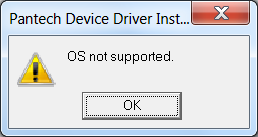
Driver portion will fail with OS not supported error. Switch to XP or Vista compatibility mode will let the install to complete.

it does labeled wrong in network connection folder, tied to the modem instead.
still in RC.
mouse does not work out of the box (same since 7.04), need to add i8042.noloop to the kernel boot line in /boot/grub/menu.lst.
people has reported before, Ubuntu is incredible slow (1GB RAM, undo disk), takes seconds between clicks, virtual unusable as is.
Delete shortcut in Virtual Machines does not actually remove VHD in appdata\local
not included anymore. Install Vista version 2.6.
No more Movie Maker HD for Vista Ultimate? (can edit HDV?)
no more Windows Mail for Vista or Outlook Express in XP.
no more Windows Calendar for Vista.
gone also?
Photo Viewer only (as dllhost, not an application). Note that shortcut keys for zoom/actual keys have been changed from XP's Windows Pictures and Fax Viewer.
supposes to replace Movie Maker, PhotoGallery IM, blog, calendar and mail (offline also?), Family Safety (Toolbar, Silverlight etc. also)
infamous "Couldn't install programs. Please try installing Windows Live programs again. Error: OnCatalogResult: 0x80072ee6 Next steps: An unknown error occurred." error installing during Windows Updates or standalone wlsetup-web.exe

regsvr32 msxml3.dll doesn't work.
uninstalling live add-in 1.4 and live ID Sign-in assistant doesn't work.
you can run wlsetup-all.exe though. (not sure that give you the latest versions though.)

gone also? Enterprise same as Ultimate except licensing - MCE etc.?
Cleartype, iSCSI, offline files, pen and touch, system icons, Tablet, TTS moved to elseware?
currently 5.0.05.290 installs under 32-bit. But
http://technet.microsoft.com/en-us/library/dd787668(WS.10).aspx
"... Cisco VPN Client (IPsec) 5.0.5+, x64
http://www.cisco.com/kobayashi/sw-center/sw-vpn.shtml
No official support for this version planned by Cisco. Use the Cisco
AnyConnect VPN Client for both Windows 7 and x64 support ..."
There is a new v.5.0.06.0160, that supposed support 32-bit Windows 7
release notes.
<http://www.cisco.com/en/US/docs/security/vpn_client/cisco_vpn_client/vpn_client5006/release/notes/vpnclient5006.html>
5100, which has MyWifi (Cliffside) PAN, does not show as a Microsoft Virtual WiFi Miniport adapter in Network Connections folder.
Driver version 12.4.1.4. (Vista is at 12.4.3.9 2009.06.25)
Not detected as Hosted Network so no SoftAP?
check the many pages about the chkdsk /r on non-primary partition issue, e.g. http://blogs.zdnet.com/Bott/?p=1235
http://www-307.ibm.com/pc/support/site.wss/WIN7-BETA.html
RC created a 100MB system partition besides the main partition if you delete the drive first. Not the case anymore?
No need for Intel chipset and matrix storage drivers anymore?